Mastering the Basic Pitch Deck PowerPoint Template
When you are standing in front of a potential investor or a major client, your slides are your co-pilot. They need to be confident, clear, and structured. This is exactly why the Basic Pitch Deck PowerPoint Presentation was designed. It is not just a set of slides; it is a strategic framework built on the anatomy of successful business proposals. If you are an entrepreneur, a startup founder, or a marketing professional, having a reliable structure can be the difference between a "maybe" and a "yes." This template offers that reliability, allowing you to focus on your story rather than fiddling with text boxes.
A Visual Framework Built for Clarity
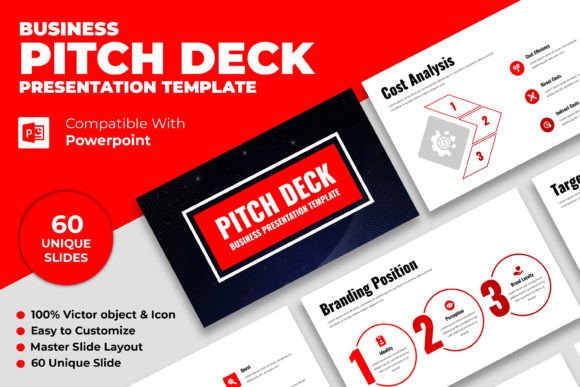
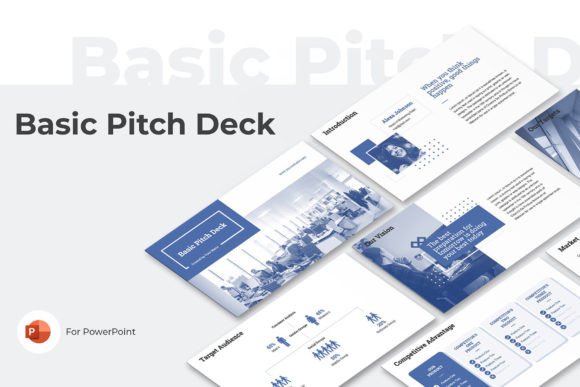
The personality of this presentation template is defined by professionalism and focus. Visually, it adheres to the principles of modern typography and data visualization. You will notice the use of big typefaces—this is a deliberate design choice. In a pitch setting, large text forces you to be concise. It eliminates the temptation to write paragraphs on a slide, ensuring your audience listens to you rather than reading ahead.
The color palette is restricted but powerful. With Blue, Green, and Red color themes, the template maintains a corporate yet energetic vibe. Blue often denotes trust and stability, Green suggests growth and finance, and Red provides the necessary urgency for calls to action or highlighting problems. These contrasting colors are not just for decoration; they serve a functional purpose in creating a strong visual hierarchy. They guide the investor's eye to the most critical data points—your revenue projections, your market size, or your unique value proposition.
Strategic Content Structure
What sets the Basic Pitch Deck PowerPoint Presentation apart from generic slide decks is its adherence to a proven narrative arc. It includes specific topics that investors expect to see, structured logically to build a compelling case. You aren't just getting blank slides; you are getting a roadmap that covers the essential pillars of a business case.
The template includes dedicated sections for:
- Problem & Solution: Clearly defining the pain point and how your business resolves it.
- Targets & Market: Demonstrating the scope of the opportunity and your specific goals.
- Project Status: Showing where you are right now in your development cycle.
- SWOT Analysis: A classic framework for analyzing Strengths, Weaknesses, Opportunities, and Threats.
This structure works because it mimics the way business leaders think. By using these pre-defined sections, you ensure that you don't accidentally skip a crucial part of your business model. For a designer or a small business owner who might be more focused on the product than the paperwork, this structure acts as a safety net, ensuring your proposal looks polished and complete.
Applications Beyond the Boardroom
While the name suggests a specific use case, the utility of this template extends far beyond simple investor pitches. The clean layout and professional design assets make it an excellent choice for a variety of business and marketing contexts. The 16:9 (1920×1080) screen size is the standard for modern projectors and widescreen monitors, ensuring your content looks crisp in any high-definition environment.
Consider using this template for internal strategy sessions. The SWOT Analysis and Market slides are perfect for quarterly reviews or annual planning. If you are a brand strategist or a marketing agency, you can adapt these slides to present a new campaign to a client. The layout is versatile enough to handle complex data without feeling cluttered.
Furthermore, the full editable nature of the PowerPoint PPTX files means you have total control. You can adjust the font pairing to match your specific brand identity. If your brand uses a specific sans serif font for digital content, you can swap it in easily. The template is designed to be a vessel for your content, not a cage that restricts it.
Practical Guidance for Customization
To get the most out of the Basic Pitch Deck PowerPoint Presentation, you need to approach the customization process with strategy, not just aesthetics. Here is how to evaluate the fit and modify the template effectively:
Evaluating Project Fit
Before you dive into editing, ask yourself if the "personality" of the deck matches your business. The clean, data-driven look of this template is perfect for tech startups, consulting firms, and service-based businesses. However, if you are a creative agency focusing on wild, artistic expression, you might find the structure a bit too rigid. For the majority of business proposals, though, the professional tone is exactly what is needed to build credibility.
Testing Font Pairings
The template likely comes with standard system fonts, but you can elevate the design by choosing a premium font. Since the slides use big typefaces, the font choice is highly visible. A good rule of thumb is to pair a clean sans serif font for headings with a highly readable serif or sans serif for body text. Ensure that the readability remains high even from the back of a conference room. Avoid overly decorative script fonts or handwritten fonts for data-heavy slides, as they can reduce legibility and undermine the professional perception of your brand identity.
Reviewing the Included Styles
Take advantage of the Blue, Green, and Red themes provided. Don't just pick your favorite color; pick the one that best communicates your message. If you are presenting financial data, Green often feels more positive. If you are highlighting a market gap or a problem, Red can be effective. You can mix and match, but ensure there is consistency. If you change the accent color on one slide, ensure it matches the rest of the deck to maintain visual unity.
Leveraging the User Guide
The package includes a User Guide PDF file. Do not ignore this. It often contains tips on how to edit master slides or how to handle the specific layout grids. Reading this guide can save you hours of frustration, especially if you are not a PowerPoint power user. It ensures you utilize the template as the designer intended, maintaining the integrity of the layout.
Conclusion
The Basic Pitch Deck PowerPoint Presentation is more than just a collection of slides; it is a communication tool designed for impact. By combining a logical narrative structure with high-contrast visual design, it helps you present your business idea with the clarity and confidence required to win over stakeholders. Whether you are pitching for funding, presenting a quarterly report, or outlining a new marketing strategy, this template provides the solid foundation you need to succeed.