Business Value Google Slides Template: A Practical Asset for Professionals
More Than Just a Pretty Deck
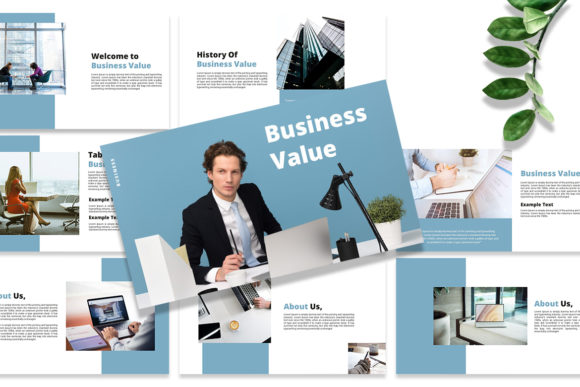
Let's be honest: building a presentation from scratch is a time sink. You're wrestling with alignment, color palettes, and font choices when you should be focusing on your message. That's the core problem the Business Value - Google Slides Template solves. It’s not just a collection of pre-made slides; it’s a structured system designed to communicate professionalism and clarity. The visual style is distinctly modern and clean, favoring bold typography and ample white space. This isn't about flashy animations or complex graphics. Its personality is confident, direct, and credible—exactly what you need when presenting data, pitching an idea, or reporting results. The overall appeal lies in its restraint. It provides a strong visual foundation without overpowering your content, making it a versatile design asset for serious work.
Where This Template Truly Shines
Think of this template as a workhorse for your professional communications. Its applications are broad, but it excels in scenarios where clarity and a polished appearance are non-negotiable.
- Entrepreneurs & Startups: Crafting investor pitches, internal strategy sessions, or client onboarding materials. The template’s structure helps frame a compelling narrative around your business value proposition.
- Marketers & Brand Strategists: Developing campaign post-mortems, quarterly reviews, or brand guideline presentations. Its clean layout ensures your data and brand identity are front and center.
- Consultants & Agencies: Delivering client reports, project proposals, or workshop materials. The professional aesthetic immediately boosts your credibility.
- Small Business Owners & Managers: Creating team meeting agendas, sales training decks, or performance dashboards. The ease of editing saves precious time.
It’s particularly effective for internal business documents, formal reports, and any context where you need to present complex information in an accessible, visually organized way. The 16:9 ratio is standard for modern displays, ensuring your presentation looks sharp in any meeting room or on a video call.
Practical Guidance for Effective Use
Having a great template is one thing; using it effectively is another. Here’s how to get the most out of the Business Value - Google Slides Template.
Evaluate Fit Before You Commit
Not every project needs this level of polish. If you're throwing together a quick brainstorm for your team, a blank slate might suffice. But if the presentation is external-facing, high-stakes, or needs to reinforce a professional image, this template is a smart choice. Ask yourself: does this audience expect a certain level of visual refinement? If yes, proceed.
Master the Drag-and-Drop
The template’s image placeholder feature is its biggest practical advantage. Don’t just drop in any stock photo. Use high-quality, relevant images that complement your narrative. A well-chosen image can enhance visual hierarchy and audience engagement far more than a generic one. The easy to change colors feature is also critical. Immediately update the color scheme to match your own brand identity or the client’s. This small step transforms the template from a generic tool into a customized brand asset.
Typography and Readability
While the template uses free fonts, pay close attention to how you use text. The included typeface is selected for on-screen readability. Avoid the temptation to cram paragraphs onto a slide. Use the provided layouts to create a clear visual hierarchy with headlines, subheads, and bullet points. This structure guides your audience’s eye and makes your key points digestible. If you need to pair another font for variety, choose a complementary sans serif font that shares a similar x-height to maintain harmony.
Leverage the Structure for Storytelling
The 25 unique custom slides aren’t arbitrary. They follow a logical flow. Use the agenda slide to set expectations. Use the data visualization slides to make numbers compelling. Use the quote or team slide to add a human element. Let the template’s structure guide you in building a coherent story, not just presenting a list of facts.
The Bottom Line: Efficiency Meets Professionalism
In a world where everyone is short on time, the Business Value - Google Slides Template is a practical solution. It eliminates the design friction that slows you down, allowing you to focus on what you do best: crafting a persuasive message. Its strength lies in its modern typography and fully editable nature, making it a flexible tool rather than a rigid cage. For the designer, it’s a robust starting point. For the entrepreneur, it’s a confidence booster. For the marketer, it’s a consistency enforcer. It’s a straightforward, no-nonsense asset that delivers real business value by making you look prepared, professional, and polished.