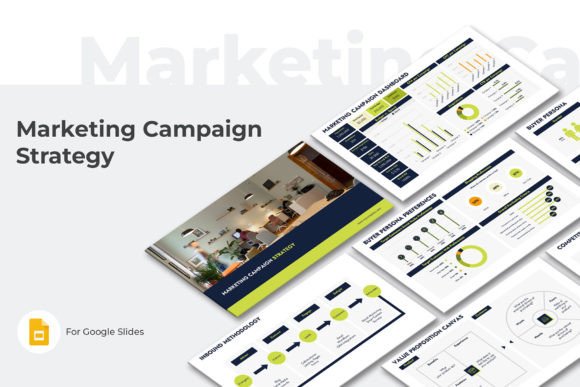
Master Your Marketing Campaign Strategy with Google Slides
A Marketing Campaign is a coordinated effort to promote a product, service, or brand to a specific audience through marketing channels. It’s the engine behind achieving core objectives like lead generation, driving website traffic, building brand awareness, and fueling sales growth. But translating that complex strategy into a clear, actionable plan for your team or stakeholders? That’s where many campaigns stumble. The Marketing Campaign Strategy Google Slide template is designed to bridge that gap, providing a structured, professional framework to map out every critical element of your campaign from start to finish.
More Than Slides: A Strategic Framework for Clarity
This isn't just a collection of pretty slides. The Marketing Campaign Strategy Google Slide template functions as a comprehensive strategic document. It guides you through defining your company's core—your mission, vision, and value proposition—before diving into the tactical specifics. You’ll find dedicated sections for outlining your Marketing Campaign Goals, selecting the right Marketing Channels, and detailing your Product offering, including its pricing strategy and positioning. This structure forces clarity and ensures nothing critical is overlooked, transforming a vague idea into a coherent plan.
Understanding your audience is paramount, and this template excels here. It includes robust frameworks for developing detailed Buyer Personas, analyzing their preferences, and applying the 6C Customer Motivation model. You can map out your Target Market and scrutinize the Competition. For digital-focused campaigns, sections like Online Store Buyers Analysis and the Inbound Methodology provide a modern, data-driven approach to customer acquisition. The visual consistency across all 30+ slides creates a unified brand identity for your internal planning documents, which often gets overlooked.
Practical Applications: From Boardroom to Brainstorm
The versatility of the Marketing Campaign Strategy Google Slide template is one of its strongest assets. For entrepreneurs and small business owners, it serves as a crash course in marketing fundamentals, providing the necessary structure to plan a launch or a quarterly push without prior experience. Marketing professionals and brand strategists can leverage it to standardize their planning process across clients or departments, ensuring every campaign starts with a solid foundation. The included Activity Calendar and Marketing Budget slides are particularly practical for operational planning.
For designers and content creators, the template offers a masterclass in information hierarchy. Observing how the deck organizes complex data—like the Value Proposition Canvas or Market Share Forecast—into digestible, visually clean layouts is a lesson in effective editorial design for presentation media. The clean, modern aesthetic with its 16:9 aspect ratio is built for today's screens, making it ideal for web design meetings or social media graphics strategy sessions. It’s a powerful design asset that does more than look good; it communicates with precision.
Building Cohesion and Driving Engagement
A consistent visual language is crucial for internal buy-in and external credibility. Using the Marketing Campaign Strategy Google Slide template ensures that every stakeholder—from the content creator drafting blogs to the sales team closing deals—is looking at the same source of truth. This alignment prevents miscommunication and keeps the entire team focused on the shared Marketing Campaign Goals. The professional polish of the slides elevates the perceived seriousness of the plan, which can be critical when seeking budget approval or investor buy-in.
The template’s design subtly influences how the information is received. The clean typography and balanced layout enhance readability, allowing the strategic content to take center stage. This is where the principles of modern typography and visual hierarchy are applied in a real-world context. A well-structured slide on your Pricing Strategy or Buyer Persona Model doesn’t just present data; it guides the viewer’s eye to the most important insights, facilitating better decision-making. It transforms a dry report into an engaging strategic narrative.
Getting the Most Out of Your Template
To effectively use the Marketing Campaign Strategy Google Slide template, start by treating it as a living document, not a static presentation. Begin with the foundational slides: define your Company mission and your core Value Proposition. From there, build out your audience profiles. The Buyer Persona and Buyer Persona Preferences sections are not just boxes to fill; they are exercises in empathy that will inform every other decision in your campaign.
Next, move to the tactical elements. Use the Marketing Channels slide to strategically select platforms where your audience actually spends time. The Marketing Campaign Highlights slide is perfect for brainstorming your key messages and creative hooks. Don’t overlook the operational slides: the Activity Calendar is your roadmap for execution, and the Marketing Budget is your financial reality check. Finally, use the Marketing Campaign Dashboard to establish your key performance indicators (KPIs) from the outset, so you can measure success effectively.
Remember, the template is a starting point. Customize the color themes to match your brand’s palette. Add or duplicate slides as needed for your specific campaign scope. The included User Guide PDF is there to help you navigate the features. By investing the time to thoroughly work through each section of this Marketing Campaign Strategy Google Slide