Restaurant PowerPoint Template: A Modern Edge for Food & Beverage Brands
A Clean Slate for Your Culinary Story
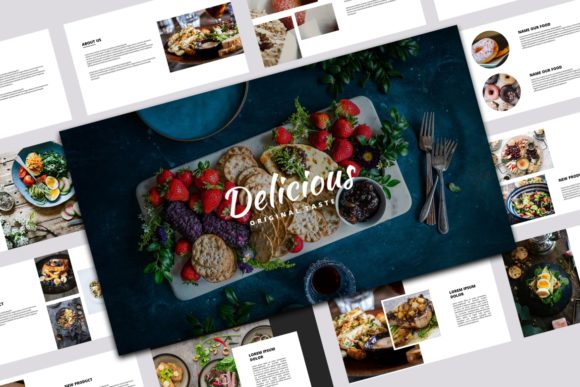
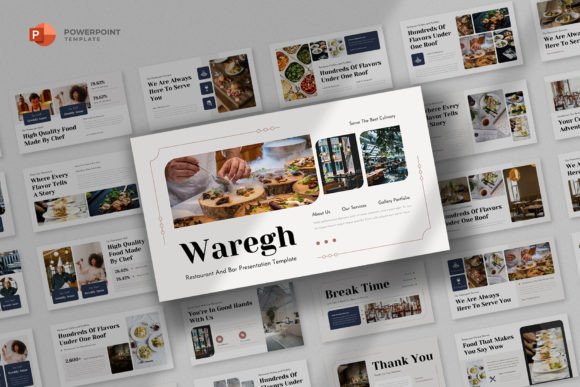
When you're pitching a new restaurant concept, launching a catering service, or presenting a quarterly report for your cafe, the tool you use matters. The Restaurant PowerPoint Template is built for this exact moment. It’s a collection of 25 slides designed with a simple, clean, and minimalist aesthetic. This isn't just about looking good; it’s about communicating your ideas with clarity and a modern edge. The template’s personality is professional and uncluttered, letting your food photography, business plans, and brand voice take center stage. It provides a polished foundation that respects your content without competing with it.
The visual appeal lies in its restraint. You won't find ornate borders or distracting patterns. Instead, the focus is on ample white space, crisp typography, and a logical flow from one slide to the next. This minimalist approach is incredibly versatile. It works equally well for a sleek, high-end bistro presentation as it does for a vibrant, fast-casual eatery’s marketing kit. The style is intentionally neutral, acting as a flexible canvas. This means you can easily adapt it to match your specific brand identity, whether that involves bold colors, muted earth tones, or monochromatic schemes. The overall appeal is one of confidence and competence, signaling to your audience that you take your business seriously.
Where This Template Truly Shines
The strength of the Restaurant PowerPoint Template is in its multipurpose functionality. It’s a design asset built for the real-world needs of food entrepreneurs and creatives. Consider a startup founder preparing a startup pitch deck for investors. The clean structure guides them to present their market analysis, menu concepts, and financial projections in a logical sequence. For a marketing manager, the same template becomes a marketing kit to brief influencers or present a new seasonal campaign to the team. The consistency across all 25 slides ensures that every communication, from an internal strategy meeting to a client-facing proposal, looks cohesive and professional.
Practically, it’s perfect for:
- Company Profiles: Showcasing your restaurant's history, mission, and team.
- Project Proposals: Detailing plans for a new location, a kitchen renovation, or a catering contract.
- Menu Presentations: Highlighting new dishes or a full menu overhaul with beautiful, editable graphics.
- Marketing & Sales Decks: Outlining strategies for social media, local advertising, or partnerships.
The drag-and-drop image placeholders are a significant time-saver. You can quickly insert your own high-quality images of your dishes, your space, or your team without wrestling with formatting. This practicality extends to the included help files, which guide even those with minimal PowerPoint experience to customize slides efficiently. The 16:9 widescreen layout is the modern standard, ensuring your presentation looks sharp on any projector or laptop screen.
Making It Work for Your Brand
Choosing this template is the first step. Making it your own is where the real work begins. Start by evaluating the project fit. Is the minimalist style aligned with your brand's personality? For most contemporary food businesses, the answer is yes. It provides a modern typography framework that feels current and trustworthy. Next, consider your content. The template’s structure helps with visual hierarchy. Use the title slides for big, impactful statements. Use the content-heavy slides to break down information with bullet points and supporting visuals. The included resizable and editable graphics allow you to adjust elements like charts, icons, and shapes to fit your data perfectly.
A critical, often overlooked step is font pairing. While the template uses 100% free fonts (specified in the help file), you might want to align it with your existing brand fonts. The clean sans-serif style used is highly legible and pairs well with a wide range of typefaces. For a more traditional feel, you could pair it with a classic serif font for headings. For a dynamic, creative vibe, a subtle script font or handwritten font for accents could work, but use these sparingly to maintain professionalism. Test these pairings on a few key slides before committing.
Remember, the images in the preview are for demonstration only. Your presentation’s power will come from your own authentic photography and content. Use the placeholders to their full potential. Drag in a stunning shot of your signature dish for a title slide. Use a candid team photo to humanize your company profile. This combination of a professional, clean presentation template and your unique, personal content is what builds brand recognition and audience engagement. It’s not just a PowerPoint file; it’s a structured opportunity to tell your culinary story with clarity and style.