Imran Google Slides Template: Professional Presentations Made Simple
You've got a brilliant idea, a game-changing business proposal, or a stunning portfolio to share. But the thought of wrestling with complicated design software just to create a presentation feels exhausting. What if there was a way to achieve a polished, professional look without spending hours on formatting? The Imran Google Slides Template is built for exactly that moment. It’s a powerful, contemporary design system that lets you focus on your content while it handles the visual heavy lifting.
This isn't just another set of slides. It's a comprehensive toolkit designed for clarity and impact. The template's clean aesthetic and intelligent layout ensure your message gets center stage. Think of it as a reliable partner for your next pitch, report, or workshop. With its intuitive structure, even those with no formal design training can craft presentations that look like they came from a top agency.
More Than Just Slides: A Complete Design System
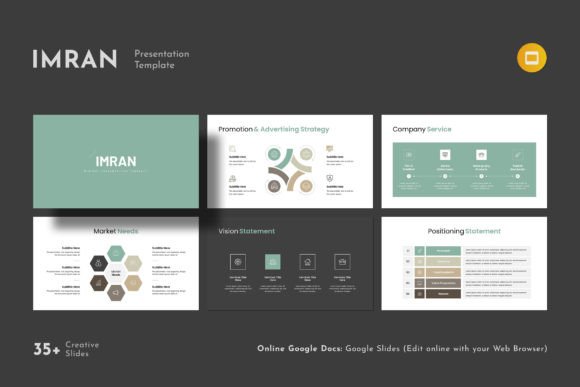
The Imran Google Slides Template stands out because it's built on a foundation of practical versatility. Its 36 slides are thoughtfully organized into sections that cover virtually every common presentation need. You'll find dedicated layouts for timelines, team profiles, data visualization, project breakdowns, and case studies. Each slide uses a master slide system, meaning you can change a color or font in one place, and it updates everywhere. This saves you from the tedious, error-prone task of editing each slide individually.
The visual personality of the template is one of confident minimalism. It uses ample white space, balanced typography, and strategic accent colors to guide the viewer's eye. This approach is perfect for brand identity work, where you need to present mood boards, color palettes, and logo concepts without the slide design competing for attention. The included 4000+ vector icons are a game-changer, allowing you to create custom infographics and visual metaphors that reinforce your points without relying on stock photos.
Real-World Applications for Busy Professionals
Where does the Imran template truly shine? Its strength lies in its adaptability across industries and roles. For entrepreneurs and small business owners, it's the perfect tool for investor pitches and client proposals. The professional tone builds credibility, while the data visualization slides help translate complex metrics into clear, compelling stories.
Marketers and content creators can leverage it for campaign recaps, social media strategy decks, or influencer partnership proposals. The clean web design-inspired layouts are ideal for showcasing digital projects. For designers and bloggers, it functions as a superior portfolio presentation tool, moving beyond static images to tell the story behind the work. Even for internal use, like quarterly reports or team training, the template's clarity ensures everyone stays on the same page.
The 16:9 aspect ratio is the modern standard, filling screens in conference rooms and on laptops without awkward black bars. The fact that it works seamlessly on both Apple and Windows via Google Slides eliminates compatibility headaches, a common pain point when collaborating with clients or team members.
Practical Guidance for Getting the Most from the Template
Adopting a new template is easy, but using it effectively requires a bit of strategy. Start by exploring the theme color option. Don't just accept the default. Take two minutes to align the primary and accent colors with your brand's palette. This single step transforms the template from a generic tool into a bespoke part of your brand identity.
Next, think about your content hierarchy. The template provides a clear visual structure, but you need to use it intentionally. Use the bold, modern headings for your key takeaways. Let the supporting slides with more text or data breathe. The easy drag and drop to change picture feature is your best friend here—swap placeholder images with high-quality photos of your team, your products, or your work environment to add a layer of authenticity.
When it comes to typography, the template uses free fonts to avoid licensing issues. The help file includes links, so you can install them on your computer for any supporting documents. While the template is a self-contained design asset, consider pairing it with a complementary sans serif font or a subtle serif font for longer text blocks in your handouts to create a cohesive typographic ecosystem for your entire project.
Finally, remember the support. The creators offer free real support from their skilled designers. If you hit a snag or have a specific customization question, don't hesitate to reach out. This human touch is what separates a good template from a great one, ensuring you can execute your vision confidently. The Imran Google Slides Template is more than a file; it's a pathway to more professional, persuasive, and stress-free presentations.